Square alternative for Mac

Looking for a Square Alternative for Mac?

Square is an excellent platform for many businesses. But perhaps the reason you're searching for a Square alternative isn't because Square is bad.

Perhaps you simply need something different.

Dedicated Mac desktop app Offline-first One-time purchase

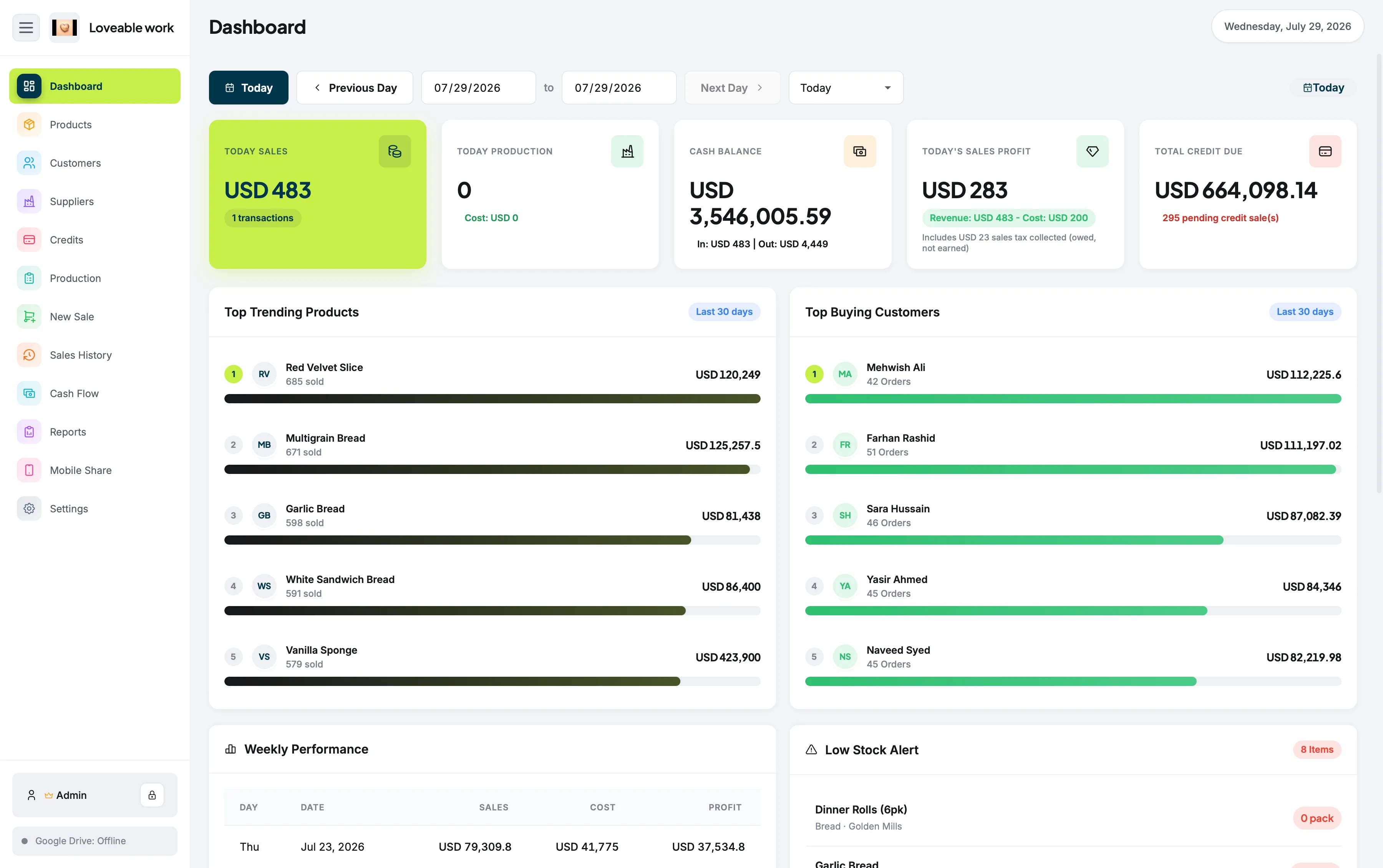
Restockly POS running on a Mac as a Square alternative, showing the dashboard with sales, cash balance and stock alerts

What you're probably after

Maybe You Don't Need Another Payments Ecosystem

A Square alternative doesn't have to mean a smaller version of the same thing. Often it means a different kind of software altogether.

That's exactly where Restockly POS fits.

  • A dedicated Mac POS
  • Less dependence on cloud services
  • Strong offline operation
  • No required monthly software subscription
  • Straightforward retail inventory management
  • Software that isn't centered around a payment-processing ecosystem
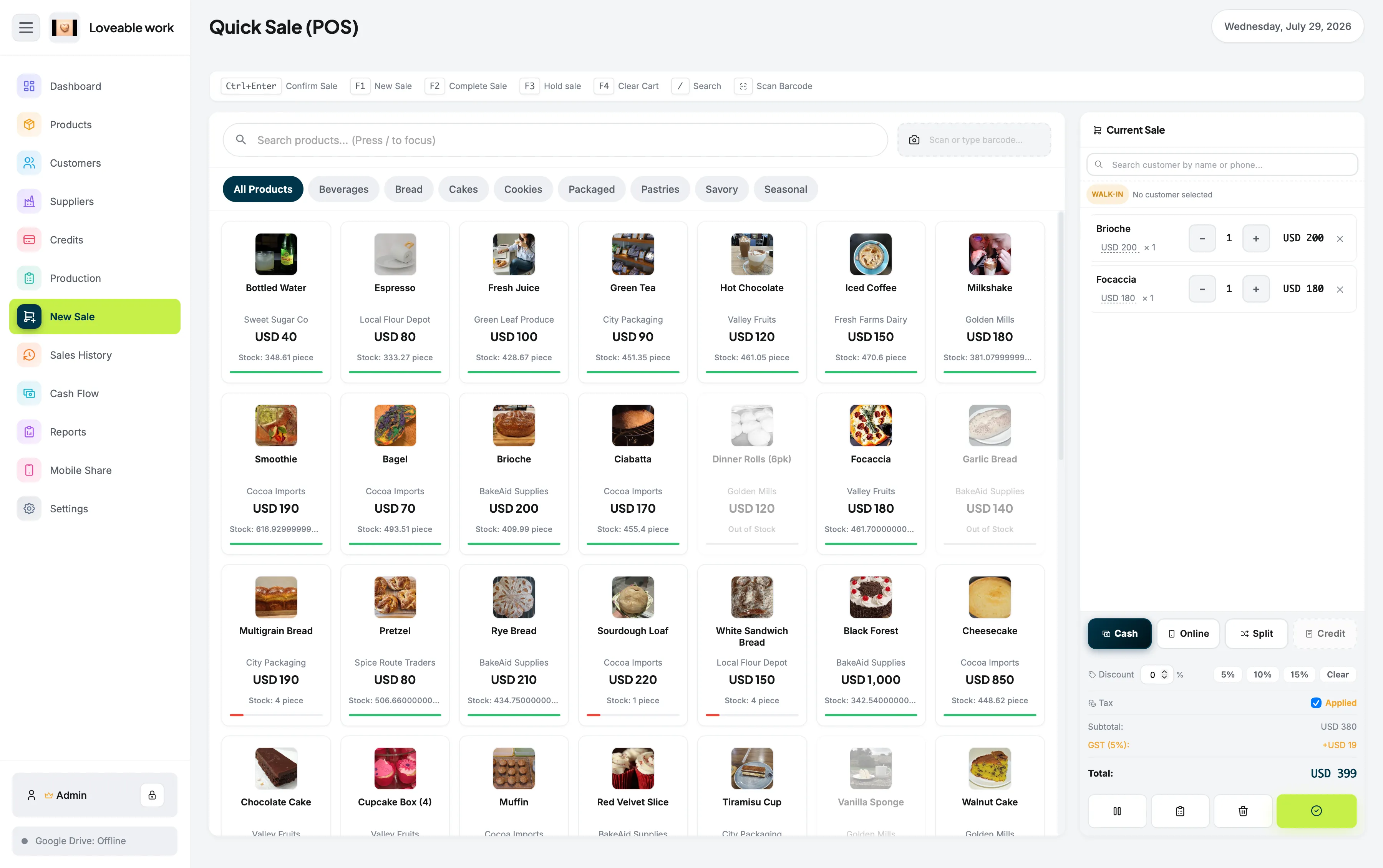
Recording a sale in Restockly POS on a Mac, with the cart building on the right

The search behind the search

Why do retailers look for Square alternatives?

Usually because their priorities are different, not because Square is a poor product. Square has evolved far beyond a simple cash register, and some independent retailers want a POS rather than an ecosystem.

It now encompasses payments, hardware, ecommerce and numerous business services. Its Free plan carries no monthly software charge, while paid plans and payment-processing charges apply depending on the products a business uses.

That ecosystem is valuable. But some independent retailers don't need an ecosystem. They need a POS.

Square details in this comparison are based on information published by Square and were last reviewed in August 2026. Plans, features and pricing change — check Square's own documentation before deciding.

Square and Lightspeed are trademarks of their respective owners. Restockly POS is not affiliated with, endorsed by or certified by either company.

A different kind of alternative

Choose It When Your Priorities Are Different

Restockly POS is not a Square clone. You shouldn't choose it because you expect every feature Square provides.

You want desktop software

Make your Mac the primary store-management system.

You want offline reliability

Run essential operations without making a permanent internet connection mandatory.

You want predictable software ownership

Purchase the POS rather than committing to another required software subscription.

You want retail management

Manage sales alongside products, inventory, customers, suppliers, cash flow and reports.

The Mac side of that is covered on POS for Mac, the architecture on offline POS software, and the pricing model on POS without monthly fees.

Deciding

Which One Should a Mac Retailer Choose?

The honest answer depends on whether payments or store management is the centre of your business.

Square is better when payments are the priority

If you need:

  • Square card readers
  • Integrated payment processing
  • Online checkout
  • Payment links
  • Ecommerce
  • Square's broader service ecosystem

Square will probably be a better choice. Square has invested heavily in exactly those capabilities.

Restockly POS is better when simplicity is the priority

If your business mainly operates from a physical retail counter and your Mac already serves as your primary store computer, you may not need all of that infrastructure.

Restockly POS gives you another option: a retail POS you can simply install and use.

A Retail POS You Can Simply Install and Use

If your Mac is already the computer behind the counter, the software that runs your store can live on it too — sales, products, inventory, customers, suppliers, cash flow and reports in one desktop application, available whether or not the connection is.

For the direct feature-by-feature view, see Restockly POS vs Square. For the wider field, our Mac POS buying guide covers seven options, including the browser-based and mobile-first ones.

Try the Square Alternative Built for Desktop Retail

Install it on the Mac you already use behind the counter and run the store from there.

Free trial available: the full app, capped at 5 products and 10 sales. No account, no card.

Free trial · v1.3.0

Download Restockly POS

Same app, same licence key — pick the build for your computer.

Download for Windows

Restocklypos-v1.3.0-Windows-x64.exe Windows 10 & 11 · 64-bit · 10.6 MB

If Windows shows a blue warning screen

SmartScreen flags every new installer until it builds download reputation. Three steps clear it.

  1. 1

    Open the downloaded .exe from your Downloads folder.

  2. 2

    On Windows protected your PC, select More info.

  3. 3

    Check the publisher and filename, then select Run anyway.

Only install files downloaded from the official Restockly POS website.

Strictly necessary

Always on

Remembers your light/dark theme and your storefront country, and lets the Paddle checkout and licence lookup work. No measurement.