Square
A broad commerce ecosystem combining POS software, payment processing, hardware, online selling and other business services.
Comparison
Square and Restockly POS can both help retailers manage sales, but they are built around very different philosophies.
Neither approach is right for every business. Here's the difference.
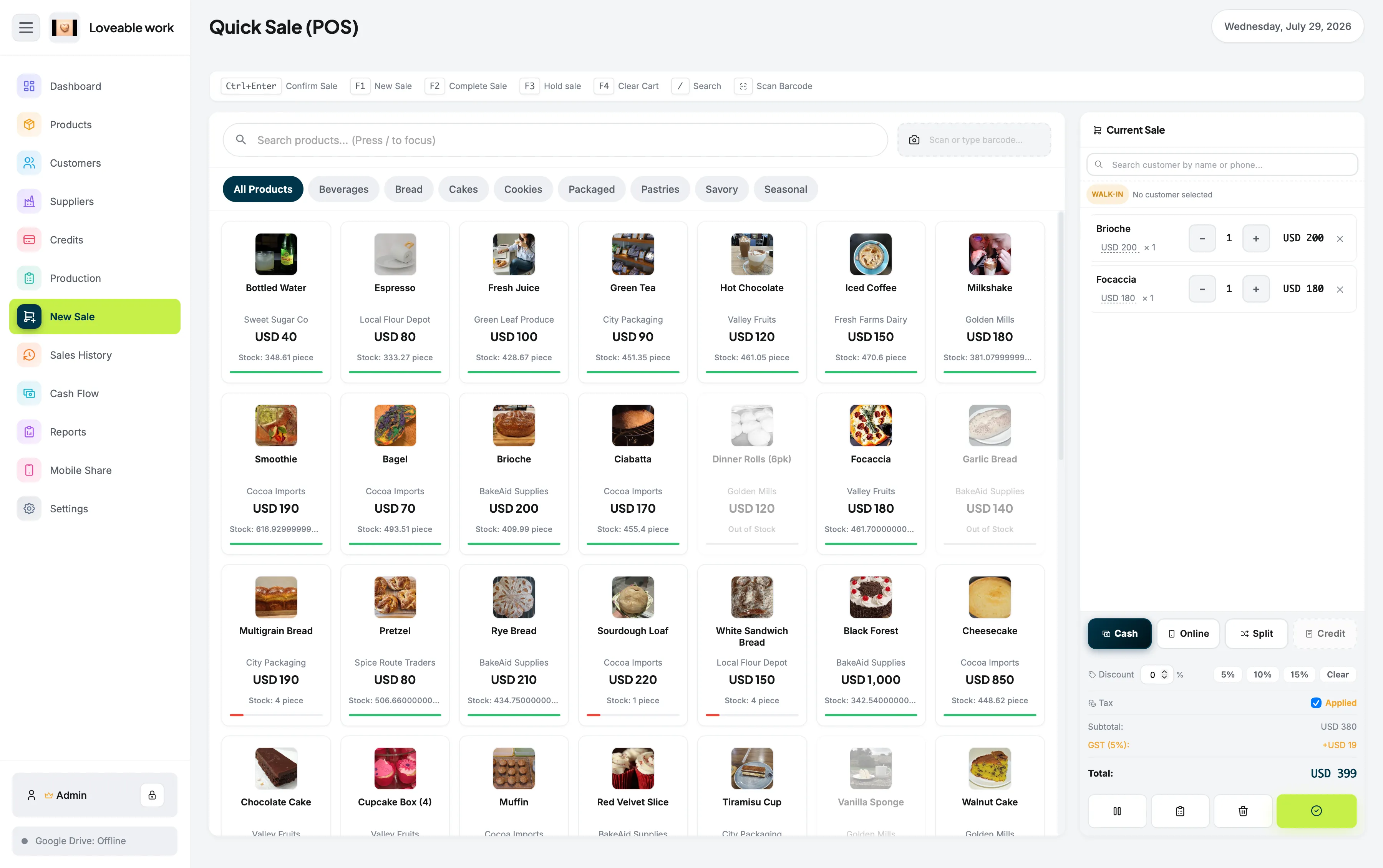
Offline-first desktop POS One-time software purchase Independent retail focus
Quick answer
It depends on what your store needs most. Square may be the stronger fit when integrated payments, payment hardware and a broad commerce ecosystem are priorities. Restockly POS may be the better fit for an independent retailer who wants an offline-first desktop POS with a one-time software purchase.
The two products are not trying to do the same job, so this page sets out where each one focuses rather than declaring a winner.
Two philosophies
A broad commerce ecosystem combining POS software, payment processing, hardware, online selling and other business services.
Focused on something simpler: a desktop POS and business-management application that can operate offline without requiring an ongoing software subscription.
Side by side
| Area | Restockly POS | Square |
|---|---|---|
| Core approach | Desktop-first POS | Commerce/payments ecosystem |
| Offline philosophy | Offline-first | Offline payments available |
| Required monthly software fee | No | Free plan available; paid plans also available |
| Payment ecosystem | Not the main focus | Major strength |
| Dedicated retail hardware ecosystem | Limited | Extensive |
| Inventory management | Yes | Yes |
| Customer management | Yes | Yes |
| Supplier/business management | Yes | Advanced retail features available |
| Internet dependence | Core functions designed locally | Primarily connected ecosystem |
| Best suited to | Independent desktop retailers | Businesses wanting integrated commerce/payments |
Square currently offers a Free plan alongside paid Plus and Premium tiers, while payment-processing charges apply when merchants process payments. Square also supports offline payments on compatible POS applications and devices.
Square details in this comparison are based on information published by Square and were last reviewed in August 2026. Plans, features and pricing change — check Square's own documentation before deciding.
Square and Lightspeed are trademarks of their respective owners. Restockly POS is not affiliated with, endorsed by or certified by either company.
Competitor strengths
Square is a powerful choice if integrated payments are central to your business. Its ecosystem includes:
Square's current compatibility lineup includes dedicated Square hardware alongside iOS and Android devices.
If you want your POS, card processor, online payment tools and hardware supplied through one ecosystem, Square has a significant advantage.
A different focus
Restockly POS isn't trying to recreate Square's financial ecosystem. Instead, it focuses on the independent retailer who wants:
Run the system from your store computer rather than building the checkout around mobile devices.
Core store-management functionality is designed around local operation.
Avoid a required monthly subscription simply to continue using the POS.
Manage products, inventory, customers, suppliers, sales history, cash flow and reports from the same application.
Direct answers
Square supports offline payments and stores them on supported devices until connectivity is restored. Offline transactions must subsequently be uploaded for processing.
Both systems can operate during connectivity problems—but the philosophy is different. Restockly POS is designed as an offline-first desktop application.
For a retailer specifically looking for software that does not depend on a permanent cloud connection, that distinction matters.
Not necessarily—Square is not simply “a monthly subscription POS.” Square currently offers a $0/month Free plan, with payment processing fees when taking payments. It also offers paid plans containing additional functionality.
Restockly POS uses a one-time software purchase model and isn't centered around taking a percentage or processing fee from every transaction.
Both points are covered in their own right on offline POS software and POS without monthly fees.
Deciding
Square is likely the stronger option if:
Restockly POS may be the better fit if:
Square is an excellent payments and commerce ecosystem. Restockly POS isn't attempting to be Square. It's designed for a different retailer.
Keep comparing
A desktop POS for independent retailers, bought once and run locally. Country-specific pricing is shown on the pricing table.
Free trial available: the full app, capped at 5 products and 10 sales. No account, no card.