Buying guide
Best POS Without a Monthly Subscription
Restockly POS Editorial Team Reviewed
Monthly POS subscriptions can make sense for businesses that depend on cloud infrastructure, integrated ecommerce and large software ecosystems. But not every retailer needs those things.
If you're running a straightforward physical store, a POS costing $50–$150 every month can become a significant long-term expense.
Fortunately, monthly subscriptions aren't your only option. This guide covers what “no monthly subscription” actually means, three options worth shortlisting, and why a free POS and a one-time-purchase POS are not the same thing.
What is the best POS without a monthly subscription?
There is no single answer, because “no monthly subscription” covers two different business models. Restockly POS is a one-time-purchase desktop POS; Square and Loyverse offer free plans funded by payment processing and paid add-ons instead.
Which one suits you depends on whether you would rather own the software outright or use a free plan inside a larger commercial ecosystem.
- Best for offline desktop retail
- Restockly POS
- Best for integrated payments without a base monthly fee
- Square Free
- Best free mobile POS
- Loyverse
Start here
What “No Monthly Subscription” Actually Means
Three different pricing models get grouped under the same search, and they are not interchangeable.
One-time purchase
You buy the software licence upfront and keep using the software without a required recurring software charge.
Free plan
The software itself carries no monthly price, and the provider earns revenue elsewhere — commonly payment processing, paid add-ons or premium features.
Subscription
A recurring charge that funds cloud infrastructure and connected services. It is the model most POS platforms use, and it is the one this guide is about avoiding.
The three pricing models are compared in full in our guide to free vs one-time vs subscription POS software.
The options
The Shortlist
Three products that avoid a mandatory monthly software fee, each suiting a different kind of store. The numbering is the order they are discussed in, not a score.
Restockly POS
Best for offline desktop retail
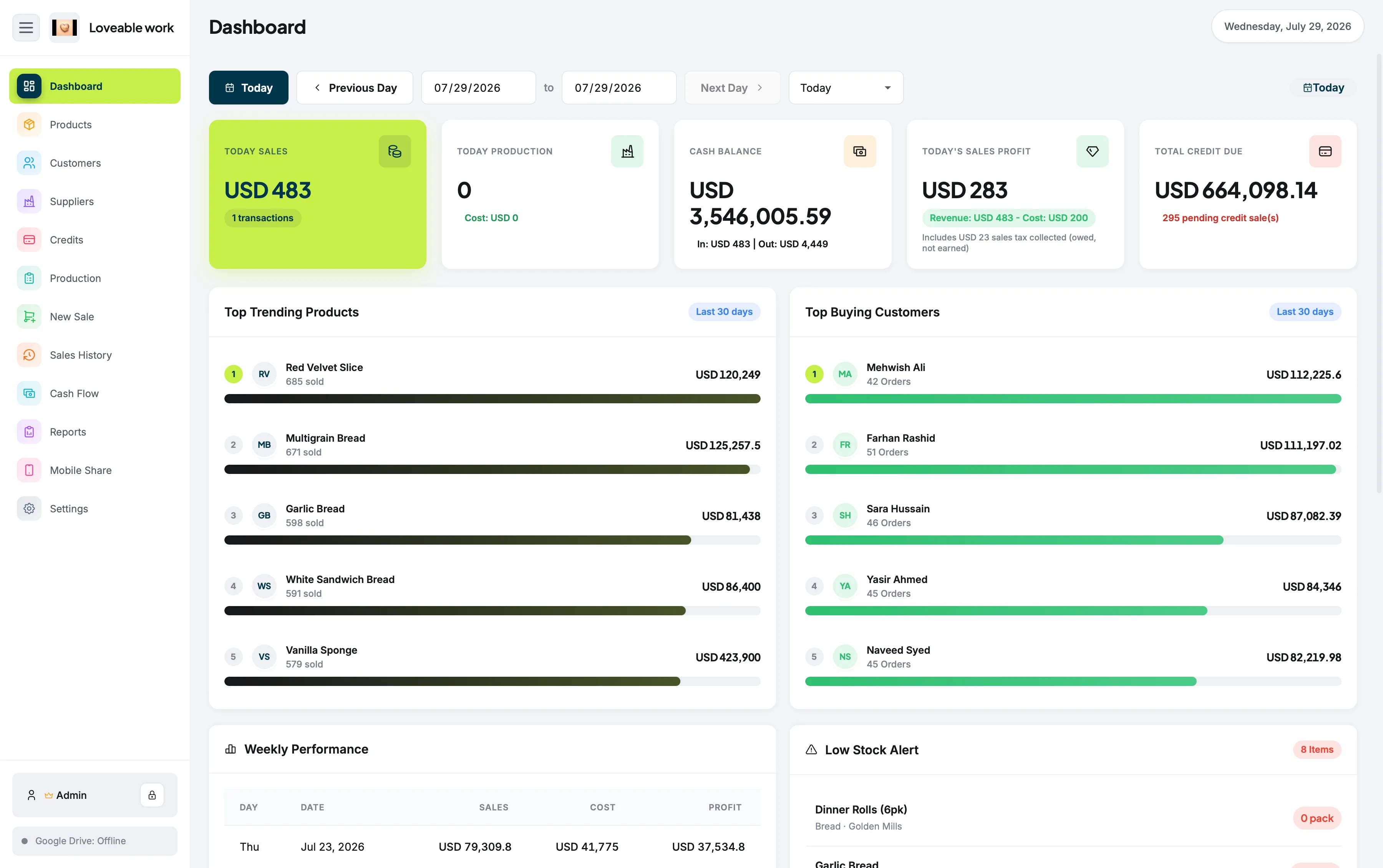
Restockly POS uses a one-time-purchase model rather than requiring an ongoing software subscription. It is aimed at independent retailers running a Mac or desktop computer behind the counter.
Its focus is straightforward retail management rather than a broad commerce platform.
What it covers
- POS sales
- Inventory
- Products
- Customers
- Suppliers
- Sales history
- Cash flow
- Reports
- Offline-first operation
It is especially relevant for businesses that would rather own their primary store software than rent access to it indefinitely — the argument for that model is set out on POS without monthly fees.
Consider something else if: you need a large integrated payment, ecommerce or multi-location ecosystem.
Square Free
Best for integrated payments without a base monthly fee
Square deserves a place on this list. Square's Free plan currently carries a $0 monthly software price, although payment-processing charges apply when businesses process payments. Paid Square plans provide additional capabilities.
Good for
- Integrated payments
- Businesses wanting a mature ecosystem
- Mobile POS
- Retailers comfortable with transaction-based costs
Important distinction: free software is not the same business model as one-time-purchase software. One removes the price of the software; the other removes the recurring charge for it.
Loyverse
Best free mobile POS
Loyverse provides its core POS free of charge and supports iOS and Android devices.
Loyverse includes sales, essential inventory, multi-store capabilities and other core features, while advanced features such as extended sales history and employee management are available as paid add-ons.
Loyverse also supports offline sales, although some functionality becomes restricted until the device reconnects.
Loyverse suits businesses looking for a free tablet or phone-based POS.
Consider something else if: your checkout runs on a Mac or desktop computer rather than a tablet or phone.
The distinction that matters
Free POS vs One-Time POS
These two models sound similar, because neither necessarily involves a mandatory monthly subscription. They are fundamentally different.
Free POS
The provider may earn money from:
- Payment processing
- Add-ons
- Premium features
- Additional services
None of that makes a free POS a poor choice. It means the relationship continues through another channel.
One-time POS
You purchase a software licence upfront.
For businesses that want standalone software rather than an ongoing commercial ecosystem, this can be easier to understand: the cost is visible once, at the start, and the provider is not funded by what happens at your till afterwards.
Deciding
Which Should You Choose?
Each of the three is the right answer for a different store.
- Choose Square
- If payment infrastructure is the main priority.
- Choose Loyverse
- If you want a capable free mobile POS.
- Choose Restockly POS
- If you want offline-first desktop retail software and prefer purchasing the software rather than subscribing to it.
Common questions
Frequently Asked Questions
Is a POS without a monthly subscription cheaper?
Not automatically. Removing a recurring software fee removes one cost, but payment processing, paid add-ons, premium modules and hardware can still apply depending on which product you choose.
Is free POS software the same as one-time-purchase POS software?
No. A free plan means the software carries no monthly price while the provider earns revenue elsewhere, commonly through payment processing or paid add-ons. A one-time purchase means you buy the software licence upfront instead.
Does Square charge a monthly fee?
Square currently offers a $0/month Free plan, with payment processing fees when taking payments. It also offers paid plans containing additional functionality.
Does Restockly POS require a monthly subscription?
No. Restockly POS uses a one-time-purchase model rather than requiring an ongoing software subscription to keep using the application.
What counts as a one-time-purchase POS?
A POS you buy once as a software licence, rather than renting access to it month by month. It suits straightforward retail operations that do not need a large cloud platform running behind the software.