Point-of-sale transactions
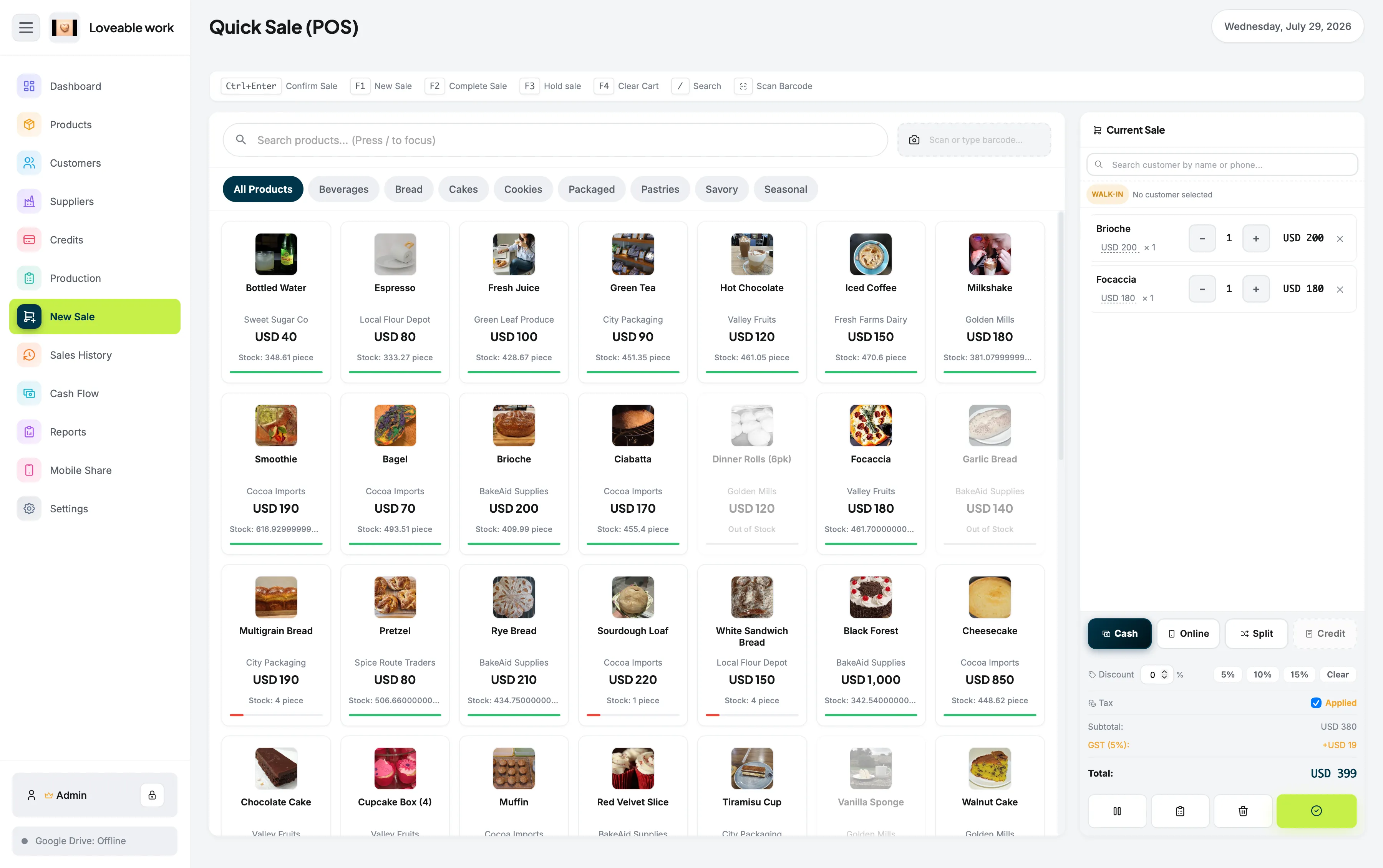
Ring up a sale from the New Sale screen and record it against the rest of your store data.
POS for Mac
You already have a Mac. You shouldn't need an expensive POS subscription, another tablet, or a constant internet connection just to run your store.
Restockly POS is desktop POS and retail management software built for Mac.
Works offline One-time purchase macOS 12 or later No account required
One application
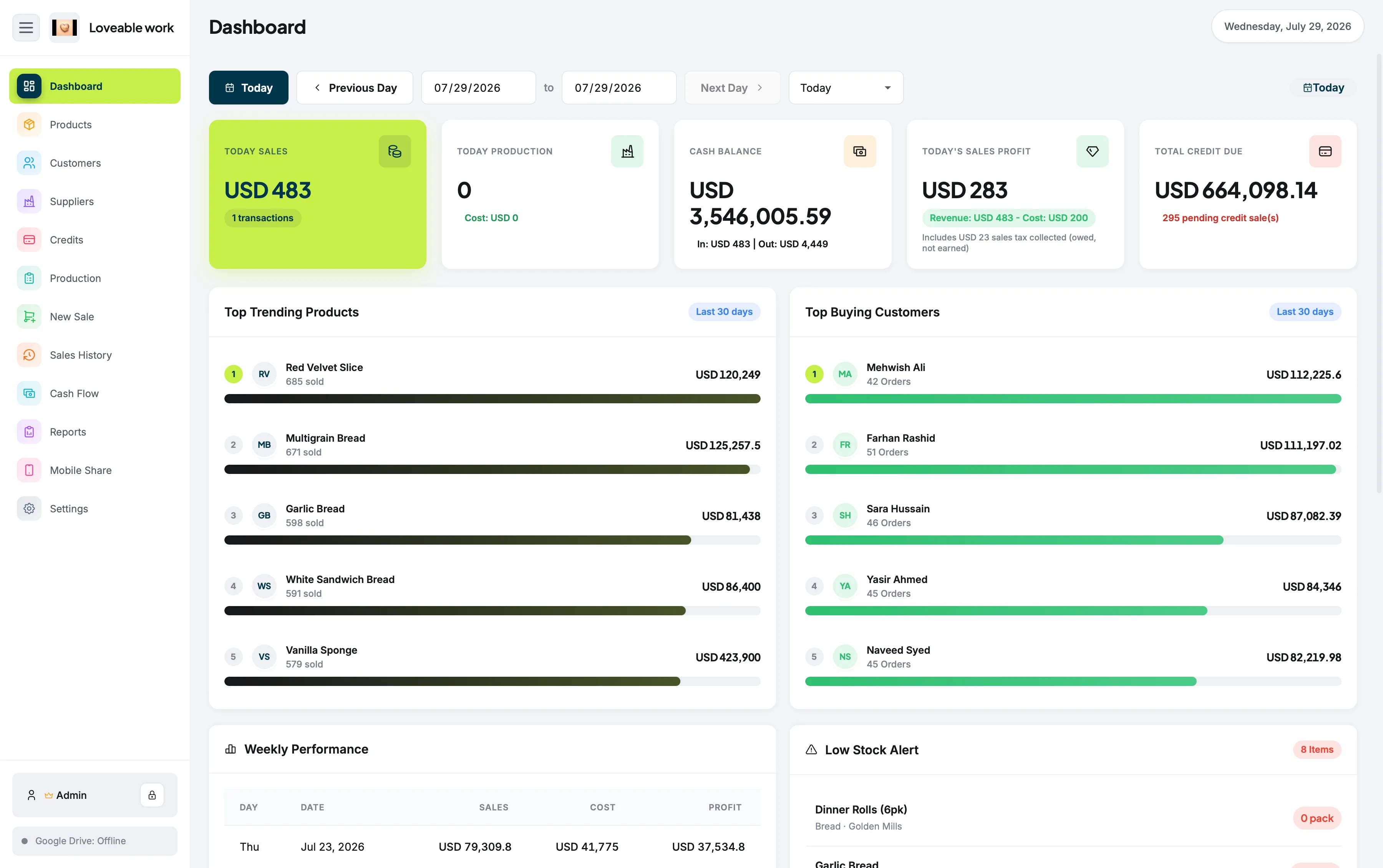
Manage your products, record sales, track inventory, organize customers and suppliers, monitor cash flow, and understand how your business is performing—all from one application.
Many modern POS platforms are built around tablets, browsers, cloud accounts, and ongoing subscriptions. Restockly POS takes a different approach. It gives retailers a dedicated desktop application where the essential parts of the business remain available even when the internet doesn't.
Ring up a sale from the New Sale screen and record it against the rest of your store data.
Keep the catalogue and the stock behind it in one place instead of a separate spreadsheet.
Maintain customer information alongside your retail operations.
Keep supplier details organised for purchasing and inventory management.
Go back through previous transactions when you need to understand earlier activity.
Follow the money moving in and out of the business.
Review the numbers behind your shop without reading transactions one by one.
One desktop application for the operational side of the shop, open all day.
Comparing other options? See Restockly POS vs Square or, if you are already on a Mac and looking to move, a Square alternative for Mac.
Offline first
A retail shop should not stop operating because Wi-Fi stopped working. Restockly POS is designed around offline use rather than treating offline functionality as an emergency backup.
Open the application, manage your store and continue recording sales without depending on a permanent internet connection.
The architecture behind that is covered in more detail on offline POS software.
Pricing model
A $40, $80 or $150 software bill may not seem large at first. But retail businesses don't use their POS for one month. They use it for years.
Purchase the software once instead of paying a required software subscription every month.
No need to keep paying simply to access your basic store-management system. The full breakdown lives on POS software without monthly fees.
Inventory + POS
A POS shouldn't only tell you how much you sold. It should help you understand what is happening inside your store. Manage products, follow stock levels, review sales history and keep important retail information together instead of maintaining separate spreadsheets and applications.
Maintain an organized product catalog for the items you sell.
Keep track of stock as your products move through the business.
Maintain customer information alongside your retail operations.
Keep supplier information organized for purchasing and inventory management.
Review the numbers behind your business without digging through transaction records manually.
If stock control is your main reason for looking, start with retail inventory software for Mac. Still weighing the field? Our guide compares the best POS systems for Mac, including the ones that reach the Mac through a browser.
You get the tools needed to run a real shop without adopting an enterprise-sized POS system. Restockly POS is particularly suited to:
Direct answers
Yes. Restockly POS installs and runs as a desktop application on macOS.
It is a dedicated Mac application rather than a browser tab or a tablet app, so the shop's sales, products, customers, suppliers and reports all live in one window on the computer you already use.
A Mac POS runs on the computer in front of you; a cloud POS runs on a vendor's servers and reaches them over the internet.
That difference decides what happens on a bad connection day. Restockly POS keeps the everyday retail workflow on the Mac itself, so it does not depend on permanent internet availability.
Keep reading
Yes. Restockly POS is designed as an offline-first desktop application, allowing core store operations to continue without a permanent internet connection.
Yes. It can be installed and used directly as desktop software on a Mac.
No required recurring software subscription is needed. Restockly POS uses a one-time-purchase model.
No. It also includes tools for inventory, products, customers, suppliers, sales history, cash flow and reporting.
It is primarily designed for independent retailers and small businesses that want straightforward desktop POS and inventory software.
If you want a straightforward Mac POS that works offline and doesn't turn into another permanent monthly bill, Restockly POS was built for that job. Buy once. Manage your store from your Mac.
One-time purchase · country-specific pricing shown on the pricing table.