Buying guide
Best Offline POS Software for Mac in 2026
Restockly POS Editorial Team Reviewed
If you run your retail store from a Mac, “works offline” deserves a closer look. Many POS products advertise offline functionality, but offline capabilities vary significantly.
Some POS systems are genuinely designed around local operation. Others are cloud applications that temporarily cache transactions when connectivity disappears.
Both can be the right choice. What matters is knowing which one you are buying before the connection drops on a Saturday afternoon. Here are several approaches worth considering.
Which POS software actually works offline on a Mac?
It depends what “offline” means in each product. Restockly POS is a desktop application designed around local operation on a Mac. Hike, Lightspeed Retail and ERPLY reach the Mac through a browser or a wider platform, and each describes its own offline behaviour in different terms.
The practical question is whether offline is the normal operating model or cover for a temporary outage. That single distinction decides what still works when the connection is already gone before you open the till.
- Best for offline-first desktop retail
- Restockly POS
- Best for cloud POS with Mac browser support
- Hike POS
- Best for advanced retail management
- Lightspeed Retail
- Best for flexible hardware and larger operations
- ERPLY
The core distinction
Not All Offline POS Systems Are Equally Offline
POS products fall into recognisably different architectural categories, and the label “offline supported” is used across all of them.
Offline-first / local-first
Core operations are designed to function locally. The connection is useful, not load-bearing.
Restockly POS is built this way: local desktop operation is the normal mode rather than a fallback.
Cloud POS with offline fallback
The product relies on cloud infrastructure but can continue some operations during a temporary outage.
Lightspeed describes Retail POS offline mode as a backup function for temporary internet interruptions rather than a complete offline-selling solution.
Browser or connected POS
Offline behaviour depends on login state, device, synchronisation status or the specific feature being used.
Hike can keep processing transactions after a connection drops, but the Hike web version needs internet to log in initially and back-office functions are unavailable offline.
These categories describe architecture, not quality. A cloud POS with a well-built fallback is a perfectly sound choice for a store with a reliable connection — it is simply a different bet from software that assumes nothing about the network.
The options
Four Approaches Worth Considering
Listed in the order they are discussed, not scored against each other.
Restockly POS
Best for offline-first desktop retail
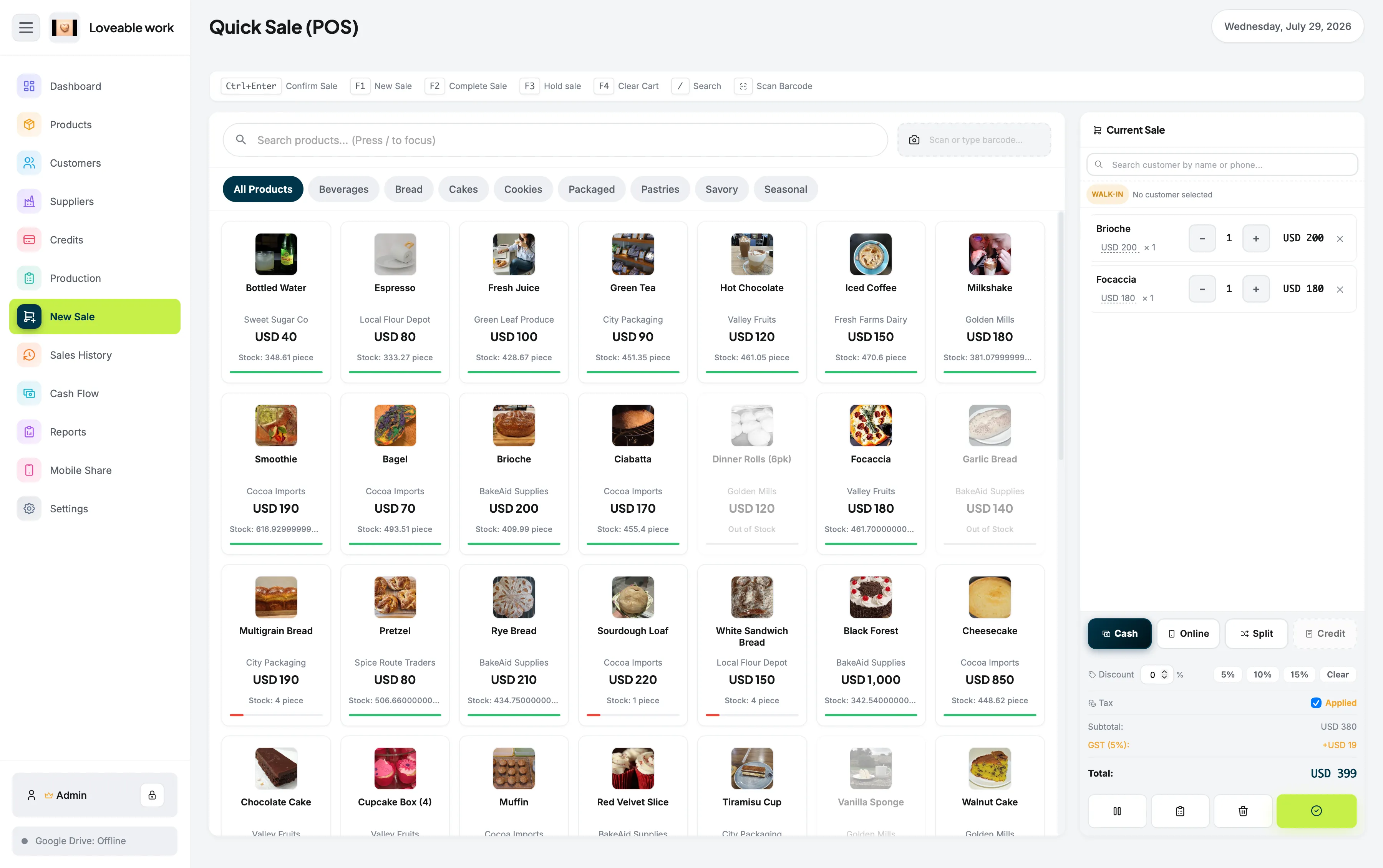
Restockly POS is designed around local desktop operation on a Mac.
Its retail workflow includes products, inventory, sales, customers, suppliers, sales history, cash flow and reporting.
Its biggest differentiator is architectural rather than a feature on a list.
Consider something else if: you need multi-location synchronisation, ecommerce or a large integration marketplace, where a cloud platform has the clear advantage.
Hike POS
Best for cloud POS with Mac browser support
Hike states that its cloud POS works on PCs, Macs and tablets through a web browser, and that it supports compatible retail hardware on Mac computers.
Hike can continue processing POS transactions after an internet connection drops, but the Hike web version needs an internet connection to log in initially, and back-office functionality is unavailable while offline.
That makes Hike a useful middle ground between fully cloud-connected and local-first POS approaches.
Consider something else if: you need to open the POS when the internet is already unavailable, or you rely on back-office work during an outage.
Lightspeed Retail
Best for advanced retail management
Lightspeed Retail supports macOS computers through supported web browsers. Lightspeed provides substantial retail-management functionality on that basis.
Lightspeed's offline mode is explicitly positioned as temporary backup functionality. Lightspeed notes that the computer must have completed an initial sync and already be logged in before connectivity is lost, and several functions remain unavailable while offline.
The two products are set side by side in more detail on Restockly POS vs Lightspeed.
Consider something else if: offline operation needs to be the normal way your store works rather than cover for an interruption.
ERPLY
Best for flexible hardware and larger operations
ERPLY supports macOS and advertises checkout access online, offline and on Mac.
ERPLY's broader retail platform targets businesses requiring more sophisticated connected retail infrastructure.
ERPLY's own documentation is the place to confirm exactly which functions remain available during an outage, since that detail decides how much the offline support is worth to a particular store.
Consider something else if: you run a single straightforward store rather than a larger connected retail operation.
Side by side
Offline Behaviour Compared
Each description below is how the vendor characterises its own product. The cells are phrases rather than ticks, because “offline sales available” and “backup mode with restrictions” are both true and are not the same thing.
| POS | Mac approach | Offline behaviour, as described |
|---|---|---|
| Restockly POS | Desktop application on macOS | Offline-first: local operation is the normal working mode |
| Hike | Web browser on Mac, with support for compatible retail hardware | Sales can continue after a connection drops; web login needs internet and back office is unavailable offline |
| Lightspeed Retail | Web browser on Mac | Backup mode for temporary interruptions; requires a completed sync and an existing login, with several functions unavailable |
| ERPLY | macOS supported alongside Windows, Linux and mobile platforms | ERPLY advertises checkout access online, offline and on Mac |
How to evaluate
What Does “Offline POS” Really Mean?
Four questions to ask before choosing
- Can I start the POS when the internet is already unavailable?
- Can I search products while offline?
- Can I access inventory while offline?
- Is offline mode a core architecture or only outage protection?
Those questions reveal much more than an “offline supported” badge. If you want to go further, four more are worth putting to any vendor:
- Can customer records be opened while offline?
- Can sales be created, not just queued, while offline?
- Does anything need to be uploaded or synchronised later?
- Which specific features become unavailable, and for how long?
The conclusion
Best Choice for Simple Offline Mac Retail
If your priority is Mac, local operation, retail inventory and no required subscription, Restockly POS is designed specifically around that combination. If your priority is a large connected platform, a browser-based cloud POS with a fallback mode will serve you better, and this guide has three of them.
For a head-to-head against the largest payments ecosystem on the list, see Restockly POS vs Square.
Common questions
Frequently Asked Questions
Does offline POS software need internet?
Not for its core operations, if the POS is designed around local use. Cloud POS products with an offline mode generally do need a connection at some point — to log in, to complete an initial sync, or to upload transactions afterwards.
Can a POS start if the internet is already down?
That depends on the product. A local-first desktop application opens from the Mac itself. Browser-based products may need a connection first: Hike states that its web version needs internet to log in initially, and Lightspeed notes that the computer must have completed an initial sync and already be logged in before connectivity is lost.
Does Lightspeed Retail work offline on a Mac?
Lightspeed does offer offline functionality. However, Lightspeed explicitly describes Retail POS offline mode as a backup function for temporary internet interruptions rather than a complete offline-selling solution, and Lightspeed Retail supports macOS computers through supported web browsers.
Is there offline POS software made for macOS?
Yes. Restockly POS is a desktop application designed around local operation on a Mac, covering sales, products, inventory, customers, suppliers, cash flow and reports. Other products in this guide reach the Mac through a web browser instead.
Which features stop working offline?
That varies by product and is worth confirming before buying. Hike states that back-office functionality is unavailable offline, and Lightspeed notes that some functions are unavailable while offline, including certain inventory and customer capabilities.