Buying guide
7 Best POS Systems for Mac in 2026
Restockly POS Editorial Team Reviewed
Mac users have plenty of POS options — but there's an important catch. Not every “Mac-compatible POS” is actually a Mac POS application.
Some run directly on macOS. Some use a browser on your Mac. Others use the Mac primarily for administration while checkout happens on an iPad, phone or dedicated terminal.
All three arrangements are legitimate. They just answer different questions about where your store's till actually lives. Here are seven options and where each fits.
Which POS system is best for a Mac?
There is no single best Mac POS, because Mac retailers are buying different things. Restockly POS suits a Mac used as the counter computer; Shopify POS suits a store that also sells online; Square suits a business built around card processing.
The labels below name the use case each product is strongest for, rather than ranking them against one another.
- Best Mac-first offline POS
- Restockly POS
- Best browser-based Mac POS
- Hike
- Best for advanced retail
- Lightspeed Retail
- Best for flexible infrastructure
- ERPLY
- Best for ecommerce + physical retail
- Shopify POS
- Best for payments ecosystem
- Square
- Best free mobile POS
- Loyverse
The distinction
“Mac-Compatible POS” and “Mac POS App” Are Not the Same Thing
Three of the arrangements appear in this guide: a desktop application on macOS, a browser-based POS used on a Mac, and mobile or dedicated-device checkout with the Mac handling administration. The POS for Mac page covers the desktop approach in detail.
At a glance
Quick Comparison
Descriptive values rather than ticks: “offline payments”, “offline sales” and “limited backup” are three different things, and a tick in each row would say they were the same.
| POS | Mac approach | Offline | Pricing style | Best for |
|---|---|---|---|---|
| Restockly POS | Desktop app | Offline-first | One-time | Independent retail |
| Hike | Browser | Partial | Subscription | General retail |
| Lightspeed | Browser | Limited backup | Subscription | Advanced retail |
| ERPLY | Mac/browser ecosystem | Available | Cloud plans | Complex retail |
| Shopify POS | Mobile POS + web admin | Connected ecosystem | Subscription | Omnichannel |
| Square | Device ecosystem + web tools | Offline payments | Free + paid plans/processing | Payments |
| Loyverse | iOS/Android POS | Offline sales | Free + add-ons | Budget mobile POS |
The options
The Seven Options
Numbered in the order they are discussed, not scored against each other.
Restockly POS
Best Mac-first offline POS
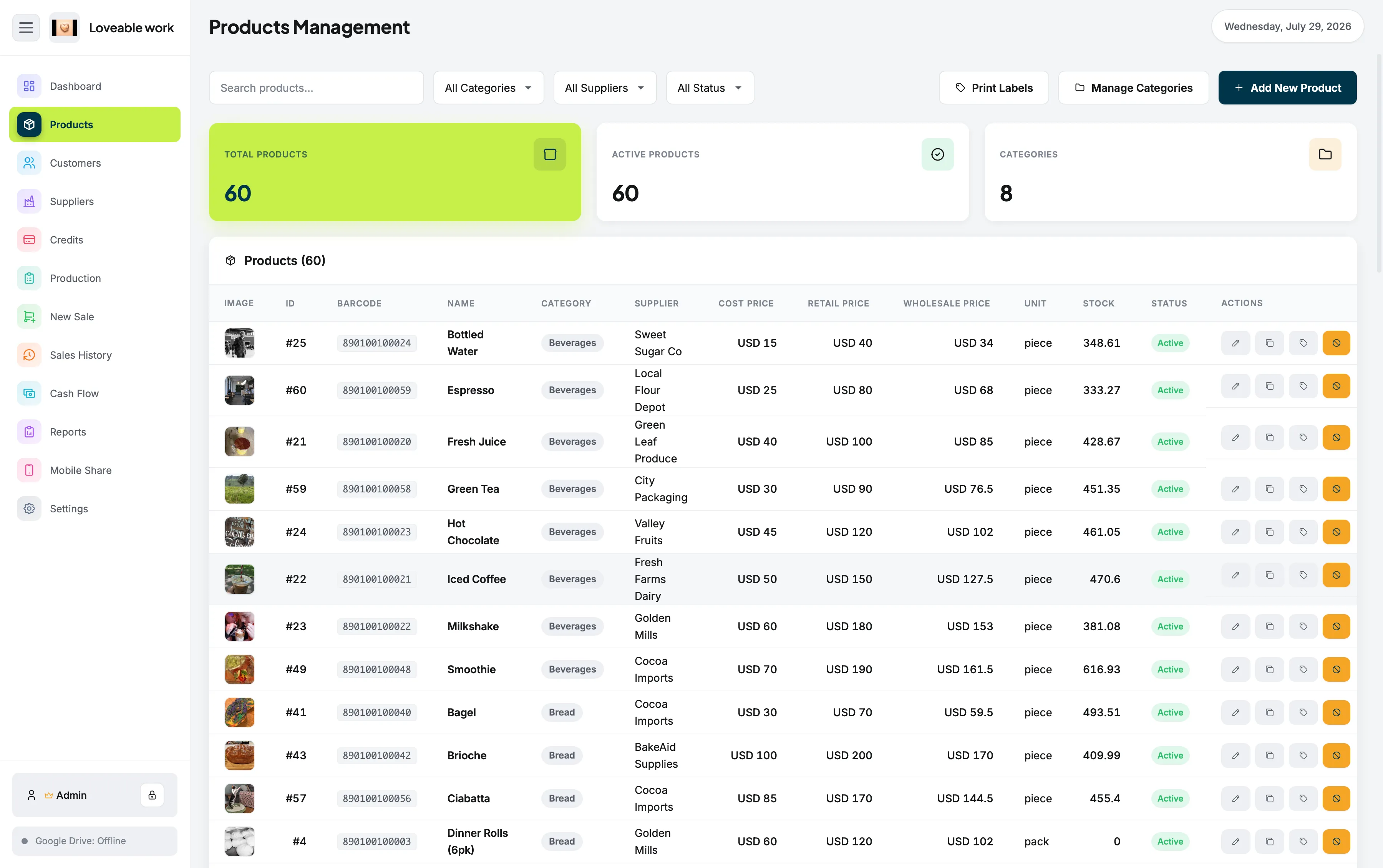
Restockly POS is the unusual option on this list because it focuses directly on the desktop retailer, with offline-first operation and a one-time-purchase model.
What it combines
- POS sales
- Inventory
- Products
- Customers
- Suppliers
- Cash flow
- Sales history
- Reports
Restockly POS suits independent stores that want their Mac to remain the centre of their retail operation rather than a window onto a platform hosted elsewhere.
Consider something else if: you need ecommerce, integrated card processing or centrally managed multi-location retail.
Hike
Best browser-based Mac POS for general retail
Hike states that its cloud POS works on PCs, Macs and tablets through a web browser, and that it supports compatible retail hardware on Mac computers.
Hike can continue processing POS transactions after an internet connection drops, but the Hike web version needs an internet connection to log in initially, and back-office functionality is unavailable while offline.
Hike suits retailers wanting a cloud system that can still use their existing Mac.
Consider something else if: you need the POS to open and run without any connection at all.
Lightspeed Retail
Best for advanced retail operations
Lightspeed supports macOS computers using modern browsers and offers deep retail capabilities including inventory, reporting, integrations and multi-store features.
Lightspeed's offline mode provides temporary resilience but has restrictions.
Lightspeed Retail suits established retailers prepared to pay for a larger platform.
Consider something else if: your store is straightforward enough that a large subscription platform would go mostly unused.
ERPLY
Best for flexible retail infrastructure
ERPLY supports Windows, macOS and Linux computers alongside mobile platforms.
ERPLY's retail offering includes checkout, inventory, orders, payments, API access and multi-store workflows, with online and offline support.
ERPLY suits businesses with more complex infrastructure requirements.
Consider something else if: you run a single store and want the simplest possible setup.
Shopify POS
Best for ecommerce + physical retail
Shopify POS is particularly compelling when an online store and a physical store need to operate as one business.
Shopify describes Shopify POS as a mobile application connected to its unified commerce back office, keeping orders, customers, inventory and payments synchronized.
Shopify's current POS hardware strategy centers on mobile and dedicated retail devices rather than using the Mac itself as the primary checkout device.
Shopify POS suits merchants already selling through Shopify online.
Consider something else if: you want the Mac on your counter to be the checkout device itself.
Square
Best for payments ecosystem
Square is one of the strongest options when payment processing is the primary requirement.
Square's ecosystem includes dedicated POS hardware, iOS and Android compatibility, payment processing and numerous connected commerce services.
Square supports offline payments on compatible devices.
A Mac can play an important role in administration and web workflows, but Square's primary checkout ecosystem is centered on supported mobile and dedicated Square devices rather than a Mac-native checkout application.
Square suits businesses prioritising integrated payments. For a Mac retailer weighing the two approaches directly, see Square alternative for Mac.
Consider something else if: the Mac is meant to be the till rather than the back office.
Loyverse
Best free mobile POS
Loyverse provides a free core POS application for iOS and Android, including inventory and sales functionality.
Loyverse supports offline sales and synchronizes data automatically after reconnecting, although some functionality is restricted until the device reconnects.
Loyverse suits very small businesses wanting a low-cost mobile setup.
Consider something else if: you want to run the store from the Mac rather than a phone or tablet.
Buying criteria
What Should I Look For in a Mac POS?
Eight things worth settling before you shortlist anything, roughly in the order they narrow the field.
-
Mac compatibility
Whether the POS runs as a macOS application, in a browser on the Mac, or uses the Mac only for administration.
-
Offline capability
Whether offline is the normal operating model or a fallback, and what stops working during an outage.
-
Inventory features
How much of your product, stock and supplier work the POS can actually absorb.
-
Pricing model
One-time purchase, subscription, or a free plan funded by processing and add-ons.
-
Payments
Whether you want card processing built into the POS or handled separately.
-
Hardware compatibility
Scanners, drawers, printers and terminals, and whether they are tied to one vendor's ecosystem.
-
Ecommerce requirements
Whether an online store needs to share stock and orders with the counter.
-
Multi-location needs
Whether one store is the whole picture, or several need to stay synchronised.
If inventory is the criterion doing most of the work for you, retail inventory software for Mac goes into that side in more depth. If it is offline behaviour, our guide to offline POS software for Mac compares how four of these products handle a dropped connection.
Deciding
Which Mac POS Should You Choose?
Six answers, each correct for a different store.
- Choose Shopify POS
- When ecommerce is central.
- Choose Square
- When integrated payments are central.
- Choose Lightspeed
- When advanced retail infrastructure is central.
- Choose Hike
- When you want a browser-based POS that works on Mac.
- Choose Loyverse
- When a free mobile POS is the priority.
- Choose Restockly POS
- When your priorities are Mac, offline, desktop, inventory and a one-time purchase.
Common questions
Frequently Asked Questions
Which POS systems work on Mac?
All seven in this guide can be used by a Mac retailer, but not in the same way. Restockly POS runs as a desktop application on macOS. Hike, Lightspeed Retail and ERPLY reach the Mac through a web browser. Shopify POS, Square and Loyverse centre checkout on mobile or dedicated devices, with the Mac used for administration and web workflows.
What does “Mac-compatible POS” mean?
It usually means the POS can be reached from a Mac, not that it is a macOS application. A browser-based POS is Mac-compatible; so is a mobile POS with a web back office. Only a desktop application makes the Mac itself the checkout machine.
Is there a Mac POS that works offline?
Yes. Restockly POS is a macOS desktop application designed around local operation. Several cloud products in this guide also offer offline modes, but each vendor describes different limits — Lightspeed positions its offline mode as temporary backup functionality, and Hike's web version needs internet to log in initially.
Can I use Square on a Mac?
A Mac can play an important role in administration and web workflows, but Square's primary checkout ecosystem is centered on supported mobile and dedicated Square devices rather than a Mac-native checkout application.
What is the best POS for a small retail store on a Mac?
For a single independent store where the Mac is the counter computer and inventory matters more than payment infrastructure, an offline-first desktop POS such as Restockly POS fits well. If the same store sells online, Shopify POS is a stronger fit; if card processing is the centre of the business, Square is.