
Offline-first, not offline-tolerant
Your database lives on your Mac. Sell during an outage, a slow day, or a dead router. Nothing queues, nothing syncs, nothing fails.
Restockly POS is offline point-of-sale and inventory software for small shops on Windows and Mac. Run billing, stock, customer credit, cash flow and reports from a local database — pay once, with no monthly fee.
Works 100% offline • One-time purchase • macOS 12+ • 10 languages • No account required
One app, configured for your business type.
Your database lives on your Mac. Sell during an outage, a slow day, or a dead router. Nothing queues, nothing syncs, nothing fails.
A one-time unlock instead of a subscription that grows with every terminal you add — or a monthly or yearly plan, if you would rather spread the cost.
Local SQLite, ZIP backups you control, exports to Excel, PDF and CSV, and Google Drive uploads to your account.
Every screen in 10 interface languages — English, Arabic, Urdu, Chinese (Simplified), French, German, Japanese, Korean, Portuguese (Brazil), and Spanish (Spain) — with full right-to-left layout for Arabic and Urdu.
Scan a barcode, apply item-level or order-level discounts, split a payment across cash and card, or park a sale as a held draft and come back to it — all without touching the mouse. Receipts print with your logo, header and footer.
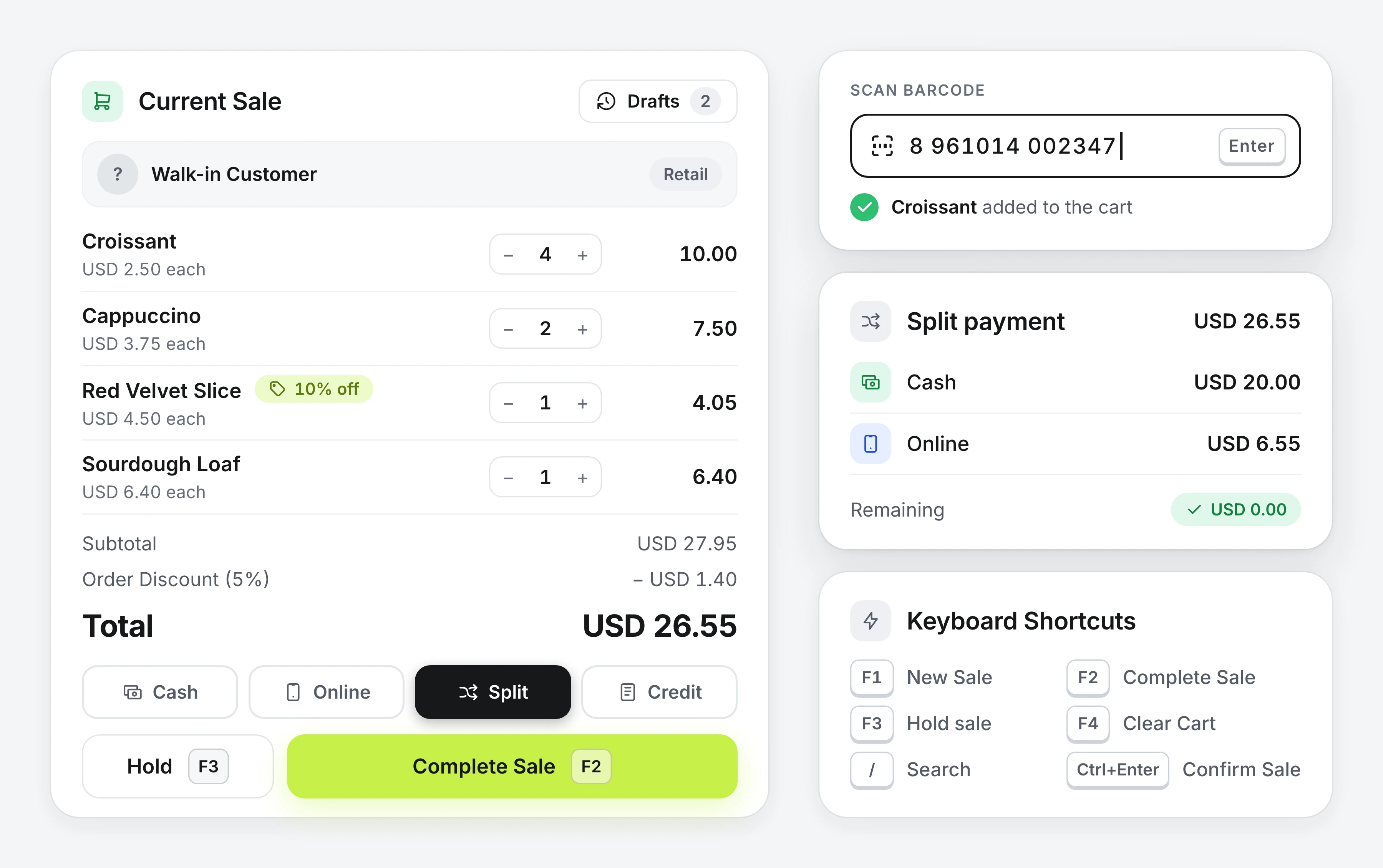
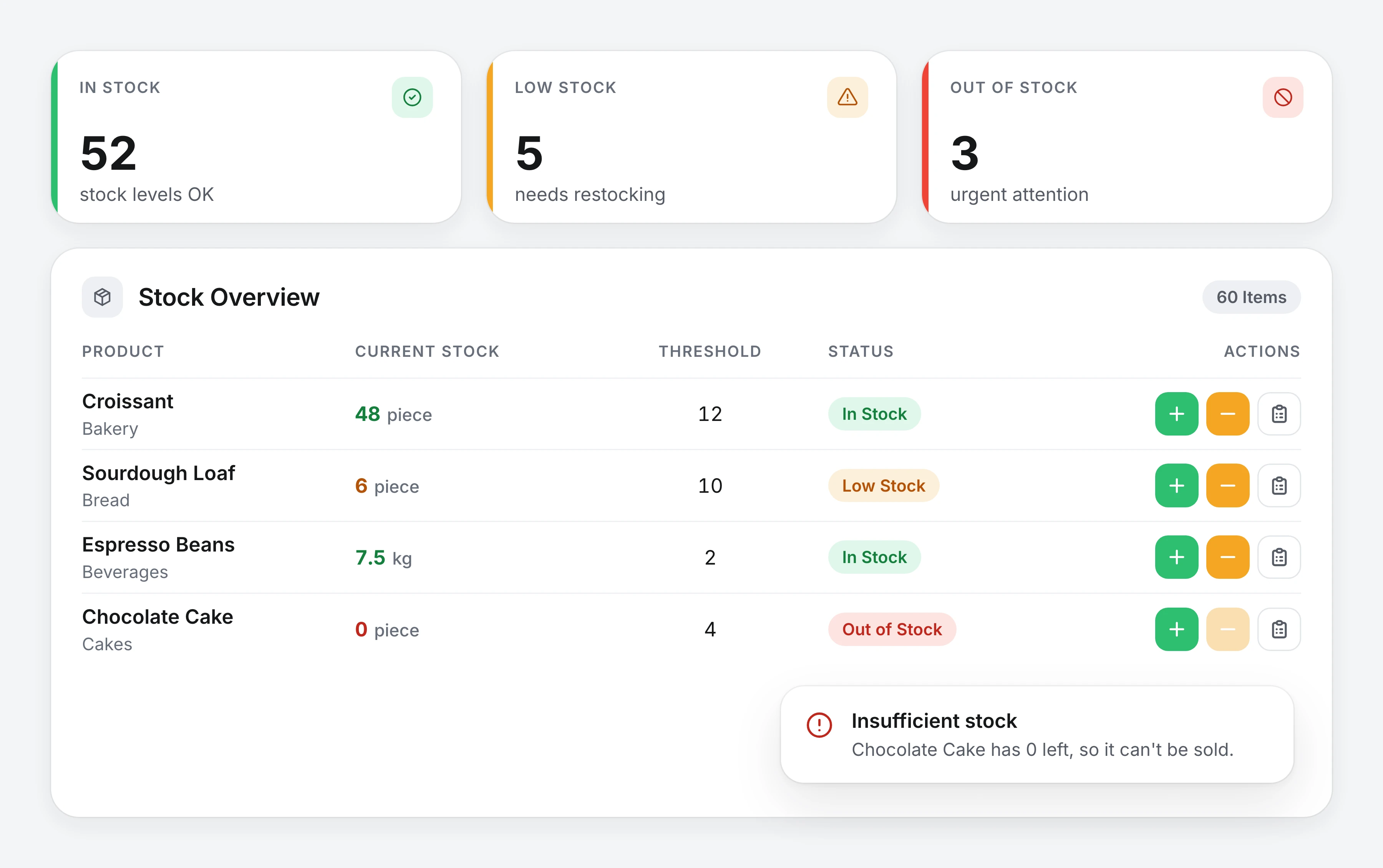
Production and purchases add, sales subtract, returns add back — and a sale is blocked below zero stock. The math closes, so the shelf and the database agree.
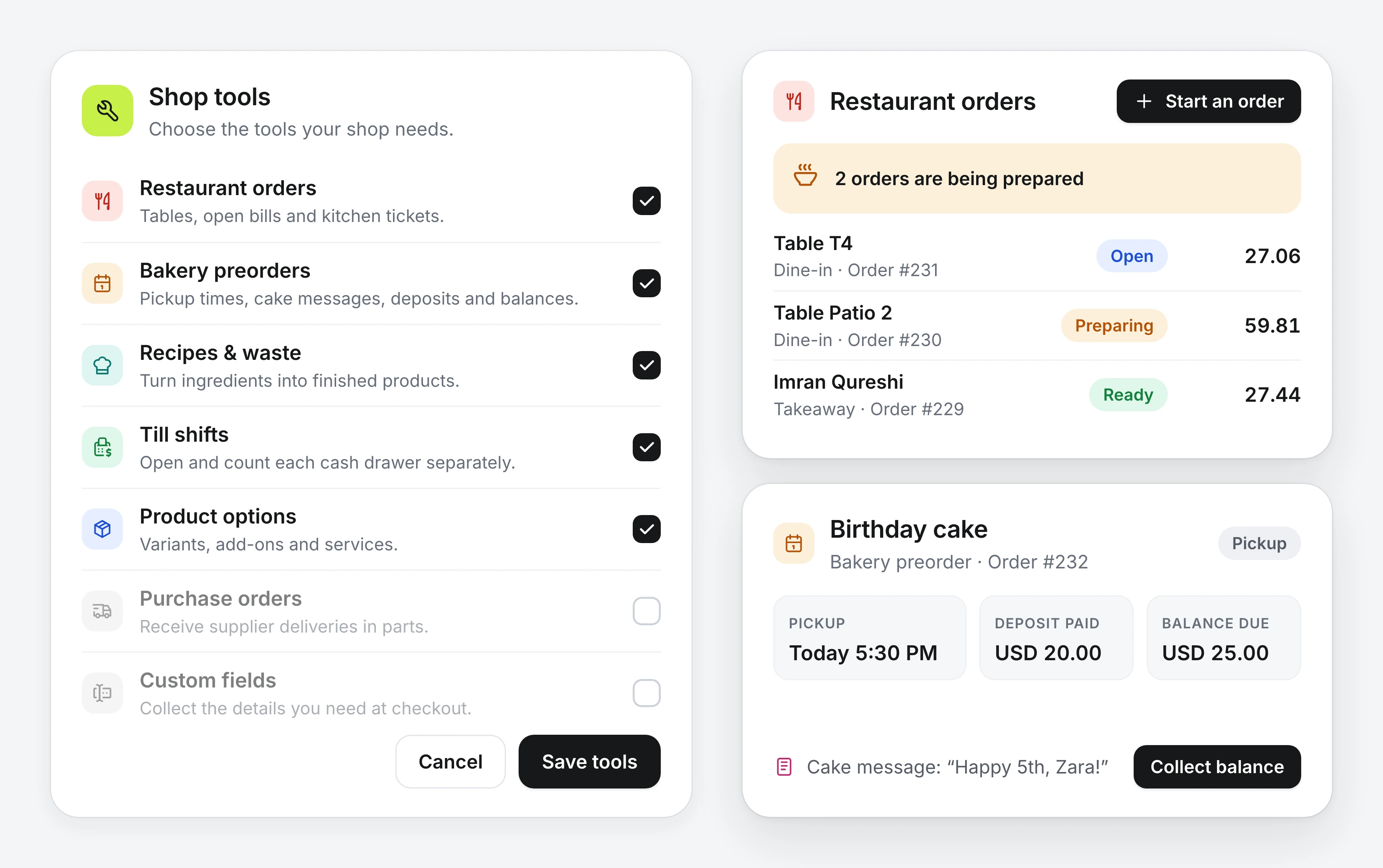
Turn on only the Shop tools your business needs. Restaurants get tables, open bills and kitchen tickets; bakeries get preorders with pickup times, cake messages and deposits. Recipes turn ingredients into stock, purchase orders can be received in parts, and till shifts count each cash drawer on its own.
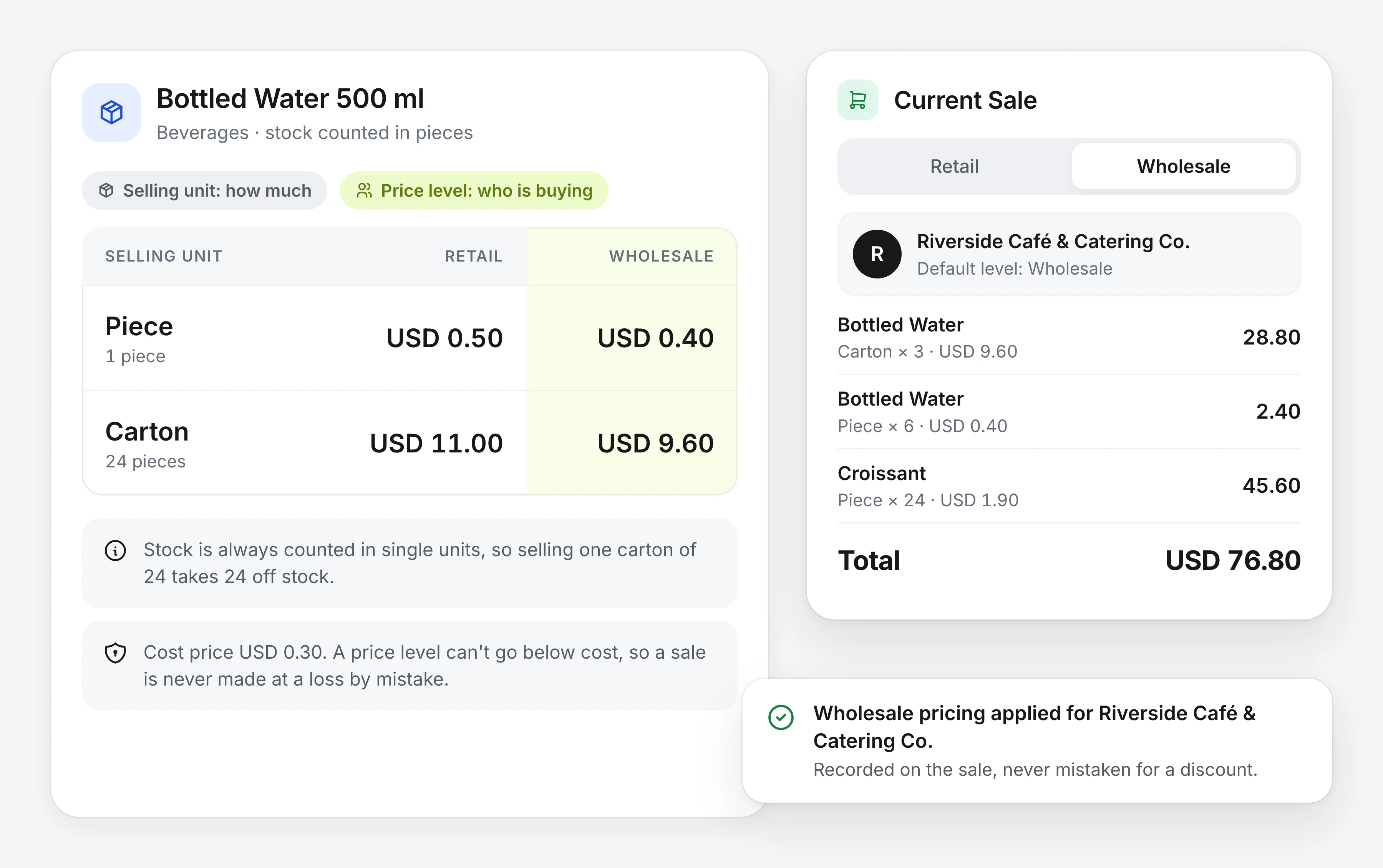
Price levels (Retail / Wholesale — who is buying) and selling units (Piece / Carton — how much) are independent of each other. A customer's default level auto-applies at the till and is recorded on the sale, so a wholesale order is never confused with a discounted retail one. Below-cost sales are blocked.
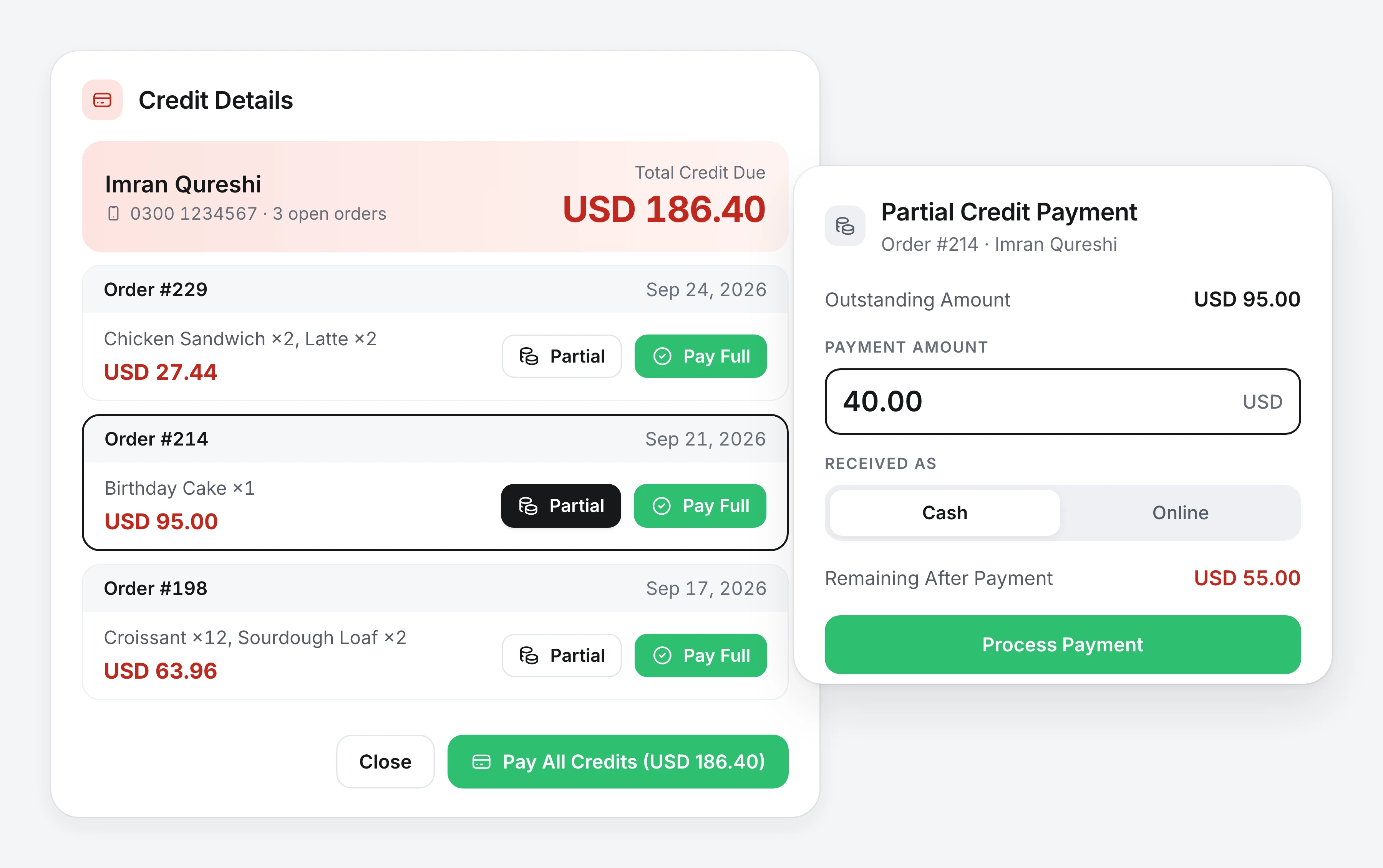
Credit accounts (digital khata) with running balances, full and partial payments, per-customer order history and stats, and a credit summary across your whole book — without buying an accounting suite.
With Mobile Share as well, credit sales above an amount you set wait for your approval from your phone — or the cashier can refuse the credit and take another payment.
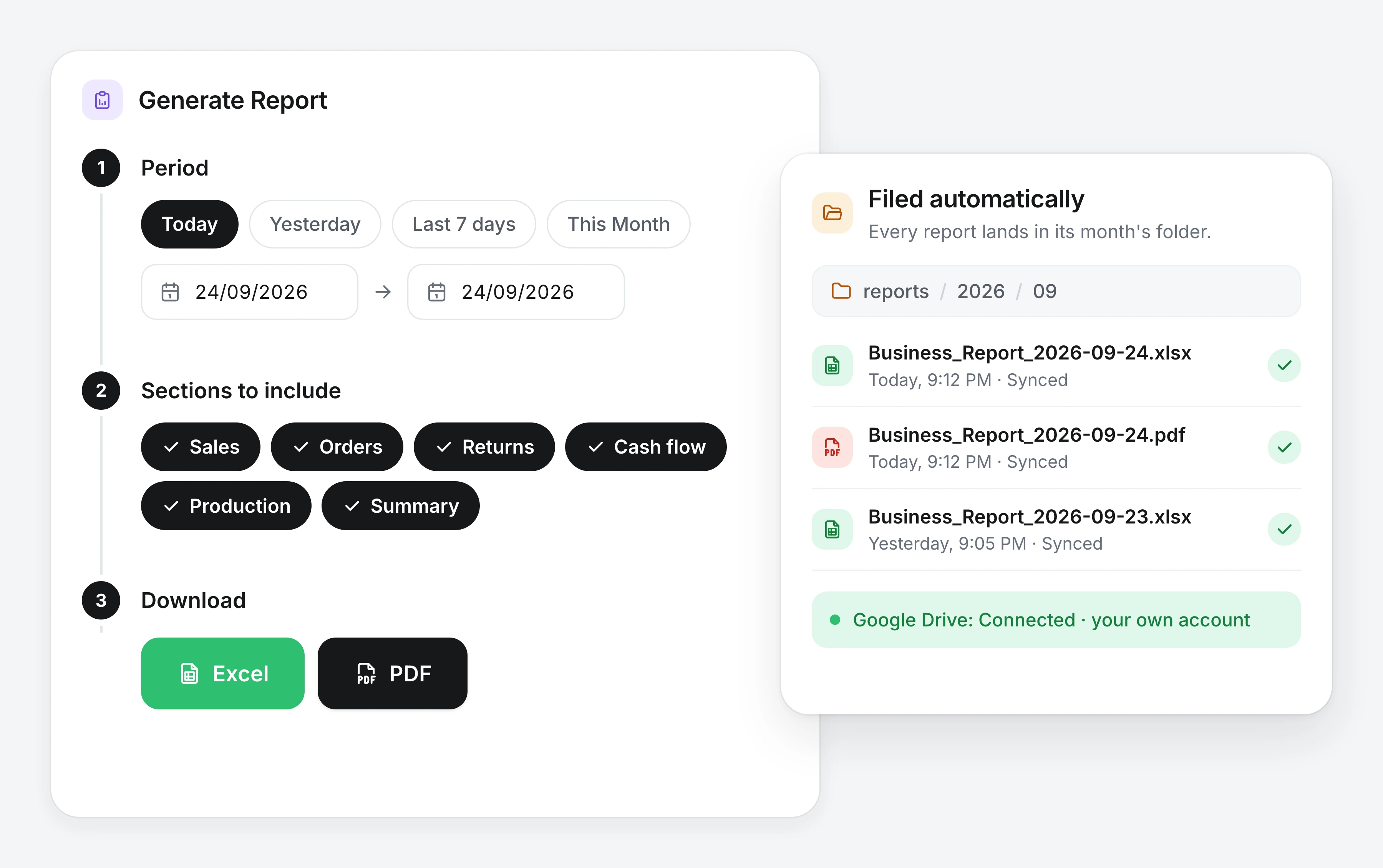
Daily and date-range reports export to Excel (.xlsx) and PDF, filed automatically to reports/YYYY/MM/, with optional upload to your own Google Drive.
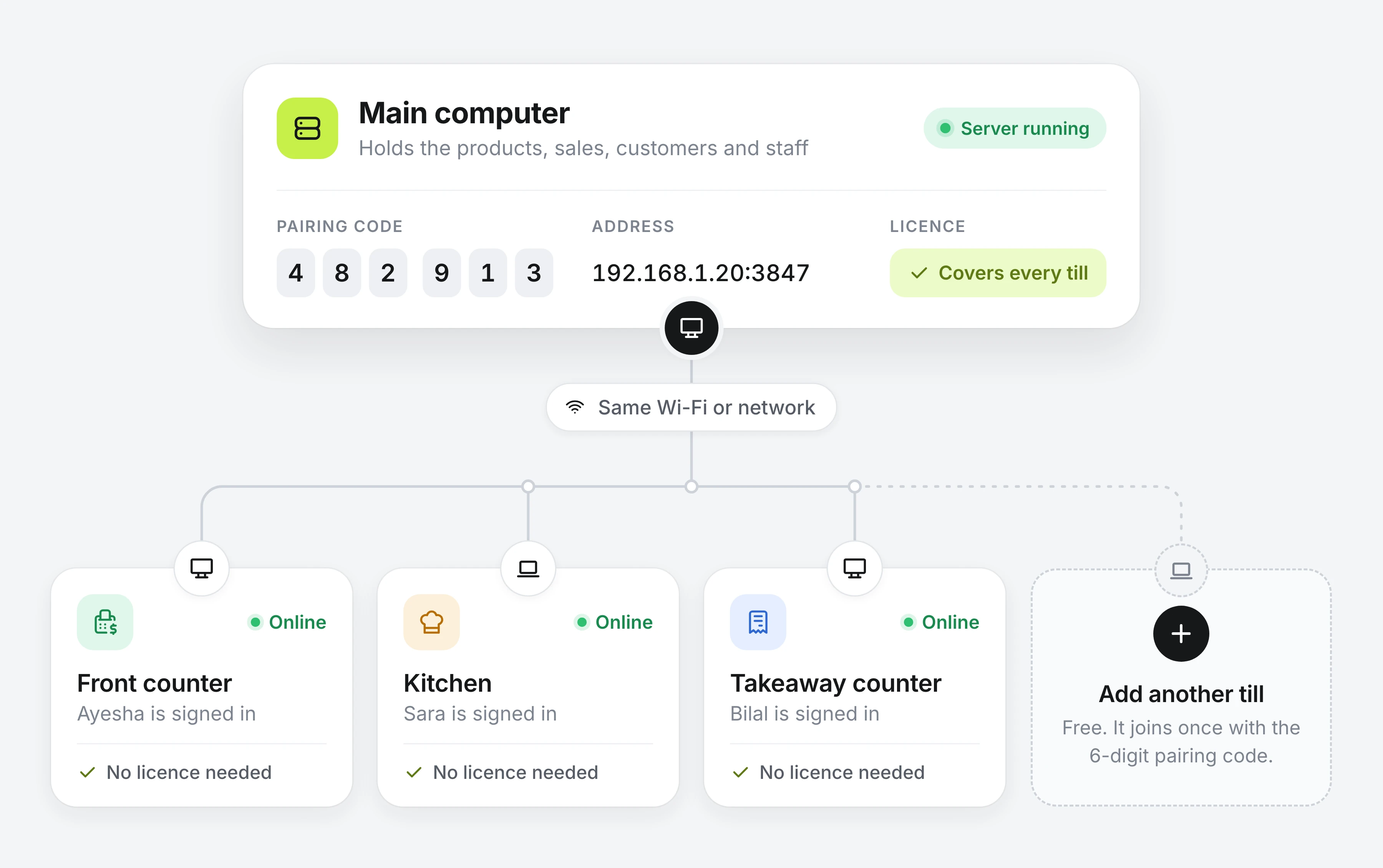
Run one computer as the main computer and connect as many tills as your shop needs over your local network — same database, live. A new till finds the main computer on its own and joins once with a six-digit pairing code. Tills need no licence of their own: the main computer's licence covers every one.
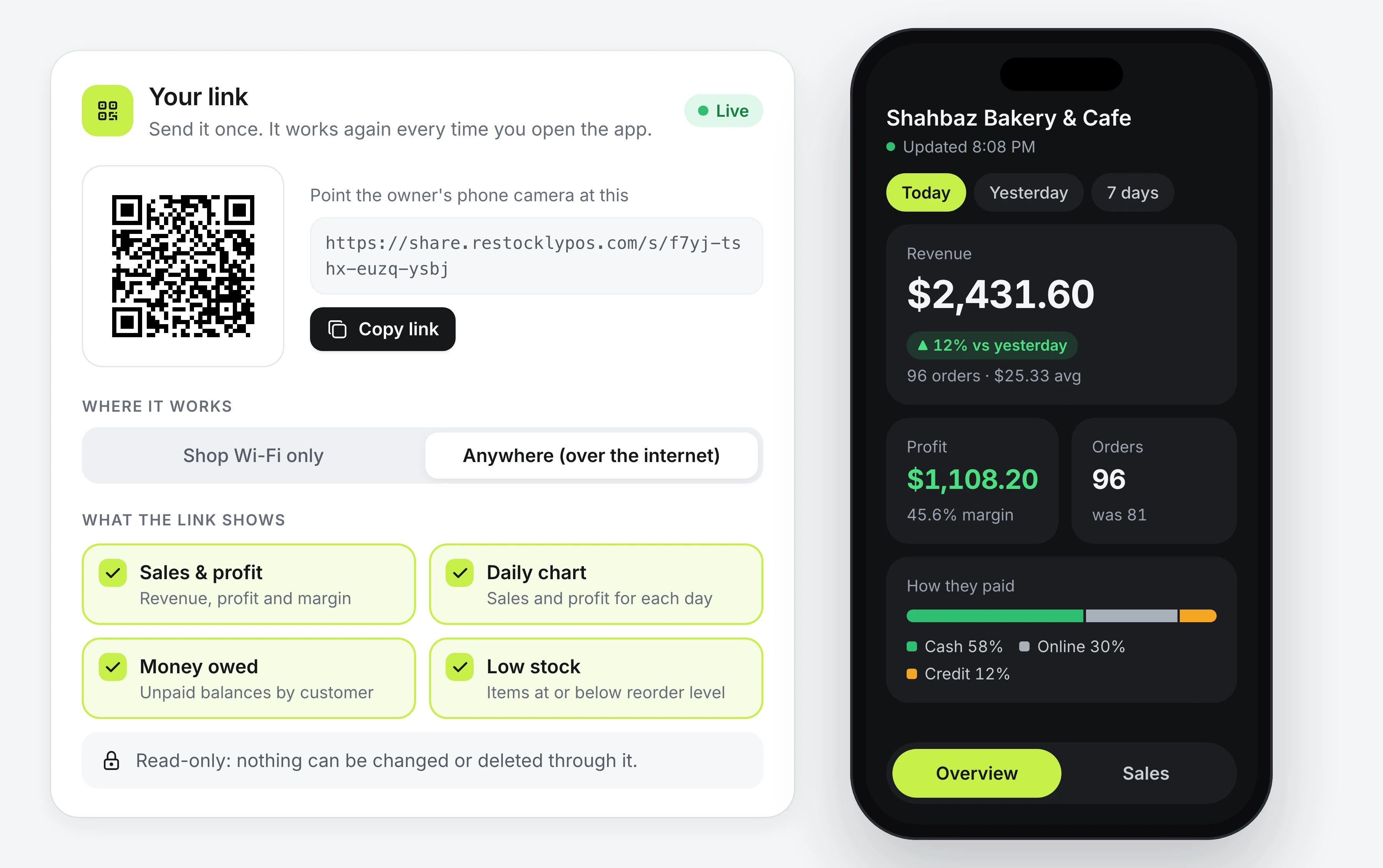
Mobile Share generates a read-only, expiring link — pick exactly which sections are shared, set a time limit, scan the QR. Works over your LAN, or a secure tunnel when you're away. Paid add-on.
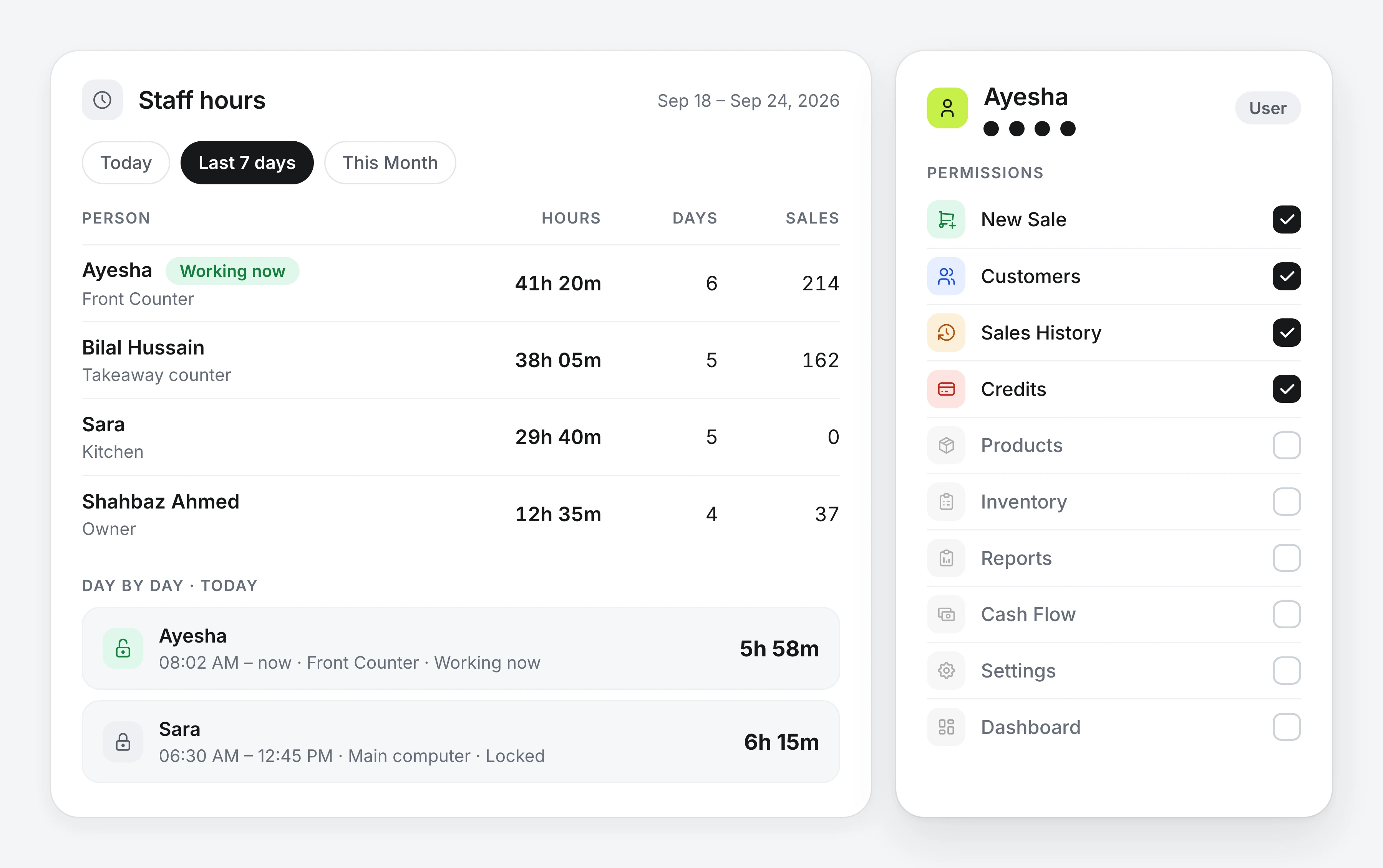
PIN login with per-user, per-page permissions across all 12 areas of the app — from the dashboard to settings. Each person's hours are recorded from their PIN unlock to lock on every till, and the Staff hours report shows hours, days worked and sales per person for any period.
DMG or Mac App Store. macOS 12 or later.
Business type, currency, language, categories, admin PIN.
Scan, charge, print the receipt. That's it.
No signup, no card, no cloud account.
| Restockly POS | Typical cloud POS | |
|---|---|---|
| Works offline | ✓ Always — the database is local | Limited "offline mode", if at all |
| Monthly fee | ✓ None required — buy once, or choose a plan | Recurring, forever |
| Data location | ✓ Your Mac | Vendor's cloud |
| Extra tills | ✓ Free — they join your main computer | Per-register monthly fee |
| Account required | ✓ No | Yes |
| Languages | ✓ 10, with full RTL | Varies |
| Runs native on Mac | ✓ Real desktop app | Browser or iPad app |
One app. Buy it once, or subscribe.
Prices are shown in your local currency. The amount charged is confirmed at checkout, with any tax added there.
The full app while you evaluate
3 days, free
Capped at 5 products and 10 sales. No card, no account.
DownloadEverything above, forever, on one computer and its tills
$29.99
USD · one-time purchase
BuyThe same app, billed by the year or the month
$14.99 / year
Renews yearly until you cancel.
Subscribe $1.99 / month| Feature | Free Trial | One-time | Plans |
|---|---|---|---|
| Products and sales | 5 products, 10 sales | Unlimited | Unlimited |
| Works 100% offline | Included | Included | Included |
| Barcode scanning, split payments, held drafts | Included | Included | Included |
| Stock control with wholesale and retail pricing | Included | Included | Included |
| Excel and PDF reports, Google Drive backup | Included | Included | Included |
| Staff PIN login, per-page permissions and staff hours | Included | Included | Included |
| Shop tools — restaurant orders, bakery preorders, recipes, purchase orders, till shifts | Included | Included | Included |
| LAN mode — one main computer, tills on one database | Included | Unlimited tills, free | Unlimited tills, free |
| 10 languages with full right-to-left | Included | Included | Included |
| Card or account required | Neither | Card at checkout | Card at checkout |
| Renews | Ends after 3 days | Never | Monthly or yearly |
| Customer credit ledger (digital khata) | Not included | Credit module | Credit module |
| See your shop from a phone | Not included | Mobile Share | Mobile Share |
Credit module and Mobile Share are paid add-ons — see below. Extra tills on your local network are free: they join the main computer and use its licence.
Optional — the core app never needs them.
Customer credit accounts (digital khata) with running balances, partial payments and per-customer history.
$9.99 · one-time
A read-only, expiring link to your numbers — pick the sections, set a time limit, scan the QR. Works over your shop Wi-Fi, or a secure tunnel when you are away.
Already bought Restockly POS? Use the same email address at checkout, so the add-on joins the licence key you already have instead of starting a second one.
Buy Restockly POS and the Credit module once and they never renew — or choose a monthly or yearly plan instead. Plans and Mobile Share renew automatically until you cancel; cancel any time from your Paddle receipt or by emailing us, and access runs to the end of the period you have paid for.
One computer per purchase, and tills that join it on your local network are free; move the licence to another computer by deactivating the old one first. Your licence key is shown immediately after payment and emailed to you. Not right for your shop? Full refund within 14 days, for any reason.
Any VAT, GST or sales tax that applies is calculated at checkout, and the total you see there is the amount charged. Payments for direct purchases are processed by Paddle.com Market Ltd, which acts as the merchant of record for those orders. Paddle handles the transaction, applicable taxes and the order receipt, so "Paddle" or "Paddle.net" is what appears on your card or bank statement rather than TOPSOL.
Restockly POS already handles multiple tax rates, tax-inclusive pricing and cash rounding. If your country needs something specific — a particular VAT, GST or sales tax setup, a tax number on every receipt, or an invoice layout your tax authority expects — send us the details and we will implement it for you as part of the purchase you are making now, at no extra cost.
Tell us your country, the tax names and rates you charge, whether your prices already include tax, and anything the receipt or invoice must show. A sample of the receipt you use today helps most.
"Internet goes down often, so offline mode keeps the till running. The customer ledger is built in, which saves time every day."
"No monthly fees, fast barcode scanning, and daily profit reports — the everyday numbers are one click away."
"The cash-flow tracker shows exactly where the money goes, and daily or monthly sales reports export straight out for accounting."
"Switching from a subscription POS removes the monthly cost, and stock alerts flag low items before they run out."
"Partial payments, returns and outstanding balances are handled in the app — no more paper registers."
"With Mobile Share, daily sales and inventory can be checked from a phone away from the shop."
Yes — selling, inventory, customers and reports all work with no connection at all, because the database is a local SQLite file on your own computer. Two things do need the internet: activating your license key once, the first time you enter it, and the optional extras (Google Drive report uploads and Mobile Share). Once activated, the app never needs a connection again.
Only if you want one. Buy Restockly POS once and own it forever on one device, or pay monthly or yearly instead — a plan renews until you cancel it. Mobile Share is an optional monthly add-on. Every price is shown for your country in the pricing section.
Restockly POS uses country-specific storefront pricing. Choose your country in the pricing section to see the exact one-time app price, the monthly and yearly plans, the optional Credit module and the monthly Mobile Share price in your local currency.
Restockly POS is offline POS and inventory software for grocery stores, pharmacies, garment shops, hardware stores, cosmetics shops, electronics stores, stationery shops, wholesalers, cafés, bakeries and service businesses.
Yes. Shop tools add restaurant orders (tables, open bills and kitchen tickets), bakery preorders (pickup times, cake messages, deposits and balances), recipes that turn ingredients into finished stock with a costed waste log, purchase orders received in parts, custom checkout fields and till shifts that count each cash drawer. Turn on only the tools you need.
In a local SQLite database on your own computer — never on our servers. You can back up and restore the whole database as a ZIP file, export to CSV, Excel and PDF, and optionally upload reports to your own Google Drive account. Weekly automatic local backups run on top.
Yes, and extra tills are free. Run one computer as the main computer and connect as many tills as you need over your local network — same database, live. A till finds the main computer by itself and joins once with the six-digit pairing code shown under Settings → Computers on the main computer. Only the main computer needs a Restockly POS licence; the tills that join it need none of their own.
Yes. Turn on PIN lock and give each person their own PIN: a session starts when they unlock the app and ends when they lock it or the next person unlocks, on every till. The owner's Staff hours report (Settings → Security) shows each person's hours, days worked and sales for any period. An optional idle lock locks a computer nobody has used for 5 to 60 minutes, but never during a sale.
Yes. The till is built for barcode scanning — scan items straight into the cart — and it prints receipts with your logo, header and footer on your receipt printer.
Yes. Price levels (Retail and Wholesale) and selling units (Piece and Carton) are independent, so one product list covers both. A customer's default level auto-applies at the till, the level is recorded on every sale, and below-cost sales are blocked.
Yes. Customers can carry credit accounts with running balances, take full or partial payments, and you get per-customer history plus a credit summary across your whole book. With the Credit module and Mobile Share together, you can set an amount above which a credit sale waits for your approval from your phone.
Your data lives in a local database file on your computer, so it stays yours whatever you pay for: export or back it up at any time, before or after uninstalling. Bought the app once? There is nothing to stop paying. On a monthly or yearly plan that ends, the app asks you to renew before it opens again — nothing you entered is deleted, and renewing or buying once brings it all straight back.
10 interface languages — English, Arabic, Urdu, Chinese (Simplified), French, German, Japanese, Korean, Portuguese (Brazil), and Spanish (Spain) — with full right-to-left layout for Arabic and Urdu, and roughly 156 currencies with correct decimal handling.
Yes — Restockly POS runs on Windows as well as macOS (12 or later). The Mac version ships as a DMG download and on the Mac App Store.
Each purchase covers one device. Deactivate the license on the old computer to free the seat, then enter the same key on the new one — both steps need an internet connection. If the old computer has been sold or won't start, you can still release the seat from the new one; the key itself is what authorises it. Restore your ZIP backup to bring your data across.
Yes. Sales history exports to CSV, reports export to Excel (.xlsx) and PDF filed by year and month, and the entire database backs up to a single ZIP you control.
Free 3-day trial — full app, 5 products, 10 sales. No account, no card.